Affiliates program
 Login
Login


Consent statistics are calculated on the visitors whose browser actually displayed the banner. Some visitors never reach that stage because an ad blocker has prevented the scripts that load the consent management platform (CMP). For them, the banner is never displayed. They still browse the site, read pages and sometimes buy, but their visits do not appear in consent reporting, and the tags that depend on their choice, from analytics to support tools, do not run.
This has nothing to do with the design or visibility of the banner, and it does not mean the CMP is misconfigured. It comes from the way ad blockers decide what to block, and it can affect any script delivered through a request that appears on a filter list.
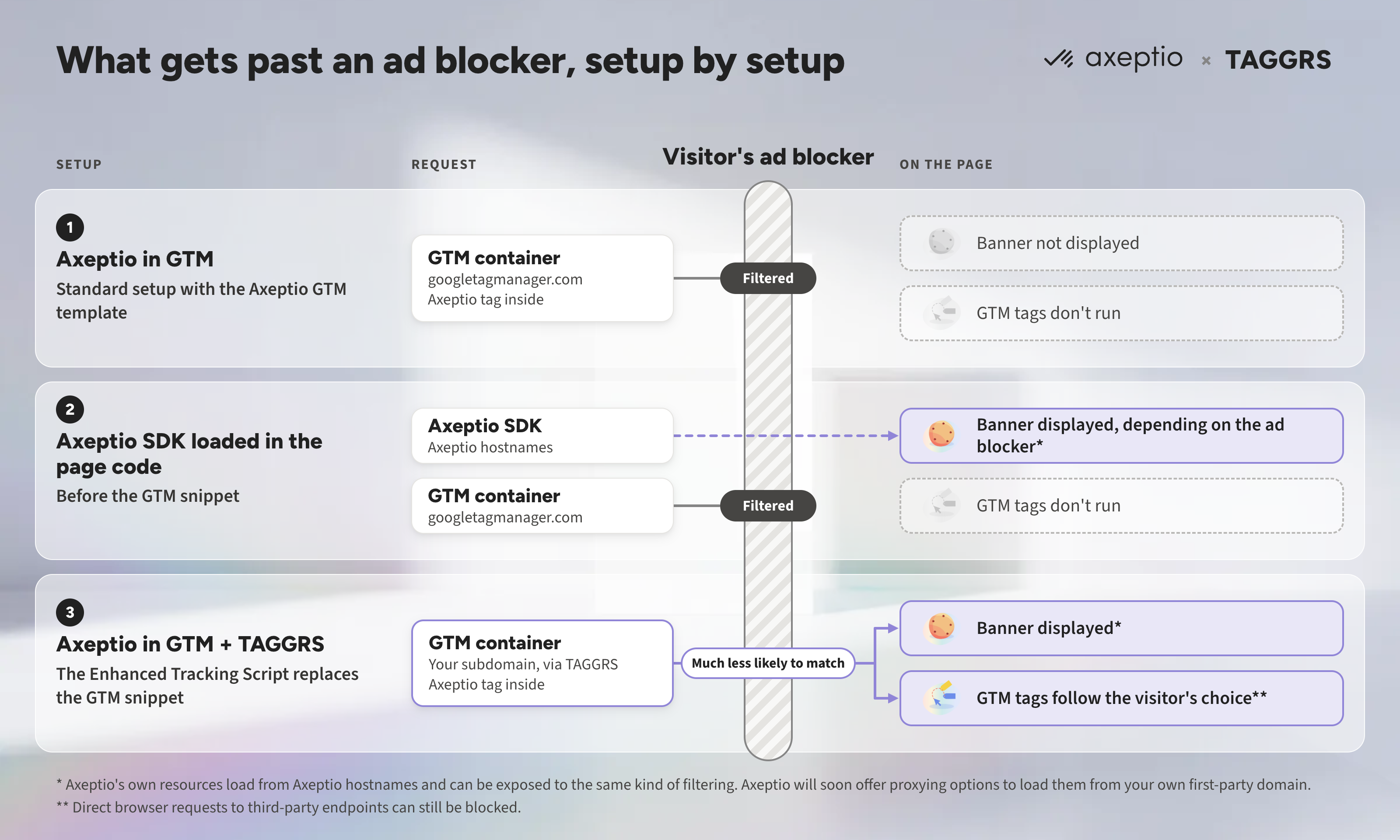
In this article, we look at how ad blockers end up stopping a CMP deployed through Google Tag Manager, why a consent platform can legitimately want its banner to reach these visitors without going against their privacy preferences, and how solutions like TAGGRS’s Enhanced Tracking Script restore the loading of the GTM container, and with it the consent banner..png?width=3200&height=1800&name=Miniature%20B2%20%C2%B7%20Version%20retenue%2c%20ajust%C3%A9e@2x%20(2).png)
Why a CMP loaded through GTM can fail to appear
Ad blockers do not analyze what a script does. They compare every request the browser is about to send with filter lists, mostly maintained by volunteer communities, and cancel the requests that match a known domain, path or pattern. For example, EasyPrivacy, one of the most widely used lists, is enabled by default in uBlock Origin and bundled with AdBlock Plus and AdBlock.
Google Tag Manager is a natural target for these lists, because it is the entry point for a large share of the analytics and advertising tags on the web. When the container request is canceled, the browser never receives the instructions it holds, so none of the tags inside it run, whatever their purpose.
A CMP deployed through GTM can be one of these tags. Integrating Axeptio with its Google Tag Manager template remains the standard setup, and for good reason: the banner, Google Consent Mode and the tags that depend on consent are managed in one place, and consent signals reach each tag in the right order. It is also the most accessible option for teams without advanced technical skills.
Some data protection officers prefer a stricter approach that keeps the CMP independent from Google Tag Manager. In that case, the Axeptio SDK can be loaded directly in the page code, before the GTM snippet. This is one of the setups Axeptio recommends when the priority is to make sure the banner loads without depending on the GTM container, with consent in place before any tag is triggered. The analytics and advertising tags, however, still run through GTM and remain exposed to the same ad blocker filtering. This is where a server-side setup keeps its full value, as you will see later.
When the CMP is loaded through GTM, the ad blocker does not interfere with its settings. It acts one step earlier, on the delivery of the container itself. From a privacy standpoint, nothing harmful happens: since the container does not load, no tracking tag should fire either. What is lost is the consent step. No decision is stored, the axeptio_update event never reaches the dataLayer, and functional services delivered through the container, such as a chat widget or a booking form, may not load.
Should a CMP try to reach visitors who block ads?
A visitor who installs an ad blocker has said something about how they want to be treated online, and a CMP has no business helping anyone override that. What needs examining is whether displaying the banner overrides it. Three arguments suggest it does the opposite.
The first is legal. An ad blocker applies lists of hostnames and URL patterns maintained by third parties. It does not know which purposes a site pursues and cannot express a choice between them. Consent under the GDPR must be specific and informed, and refusing must be as easy as accepting. A visitor who never sees the banner has not been asked, and the site has no record showing that a choice was offered.
The second concerns what a container actually carries. Tag managers routinely deploy services that have nothing to do with advertising: the consent manager itself, fraud prevention, live chat, payment or booking widgets. Blocking the container removes them along with the trackers, and a visitor who would gladly accept a support chat while refusing ad personalization has no way to say so.
The third is that the banner is what makes a refusal enforceable. When a visitor clicks "Refuse", the CMP stores the decision, sets Consent Mode signals to denied and lets every downstream tag, in the browser or on the server, act on it. Without the banner, there is no decision to propagate, and end users must rely solely on their ad blockers to ensure control over their data.
This reasoning holds under one condition: restoring the container must never restore tracking by default. Every tag inside it has to stay conditioned on the choice the visitor makes. Axeptio’s server-side partner TAGGRS sets out the same principle in the documentation of the tool described below, which it presents as a way to improve consented measurement, not to track users against their choices.
Restoring the container with TAGGRS's Enhanced Tracking Script
Since filter lists work by recognition, the most effective answer is to make the container request less recognizable. This is the principle of the Enhanced Tracking Script developed by TAGGRS, the Dutch server-side tracking platform with which Axeptio announced a partnership to help brands build a reliable and compliant data collection setup.
The script replaces the standard GTM snippet on the site. It masks the GTM loader and encrypts the paths of the event requests sent to the server-side container, so rules looking for googletagmanager.com, a container ID or a typical tracking path are much less likely to match. The container is delivered through the site's TAGGRS server container, on its own subdomain, rather than requested directly from Google's domain.
For Axeptio users, the first effect is the consent step itself. Once the container loads, the Axeptio tag inside it fires and the banner is displayed with the configuration already in place. The visitor's choice is recorded, passed to Google Consent Mode and, with the TAGGRS–Axeptio configuration, sent to the server container, where it decides which server-side tags may fire. A visitor who would otherwise have been skipped entirely is now asked and their response is enforced across the stack.
From there, TAGGRS highlights two further benefits. The script increases the volume of events captured by GA4 and advertising platforms, including from visitors who use an ad blocker or privacy-focused browser settings. And, combined with the right server-side setup, it helps cookies last longer in browsers that restrict them, such as Safari with its Intelligent Tracking Prevention (ITP). Because the consent step now happens first, the additional events recovered are events the visitor agreed to.
TAGGRS specifies that it does not replace server-side tracking and that direct browser requests to third-party endpoints can still be blocked. Its role is to secure the loading of the container, which is the first link in the chain.
Implementation takes a few steps: activating the script in the TAGGRS dashboard with your GTM web container ID, replacing the standard GTM snippets on the site (the two must never run side by side), and adding a dedicated client in the server container. The detailed procedure and expected behaviors are on the Enhanced Tracking Script page. To pass Axeptio consent to the server container, follow Configure TAGGRS with Axeptio using GTM, and Axeptio's Server Side Tracking Setup guide for the CMP side.
The next step: securing the CMP’s own resources
With the container secured, the CMP's own resources are the next step. The Axeptio tag loads the SDK, its configuration and the consent API from Axeptio hostnames, and those requests can be exposed to the same kind of filtering.
The good news is that Axeptio will soon offer new proxying options, allowing the CMP and all its components, including API calls, to be loaded from your own first-party domain.
In the meantime, a server-side setup with TAGGRS already brings several benefits. Setting Axeptio cookies on the server side protects them from browser restrictions, which helps reduce what is known as consent fatigue: the visitor’s choice is kept for the full period configured in the CMP instead of being cut short by browser restrictions, so returning visitors see the banner less often and face less friction.
These layers complement each other. A delivery path that filter lists struggle to recognize lets the banner reach visitors it currently misses. Cookies written server-side, from infrastructure aligned with the site's domain and IP address, can persist long enough in Safari to keep attribution intact for conversions that take days or weeks, as TAGGRS explains in its article on server-side tracking and consent. Together, they give more visitors the chance to make an informed choice, and give brands data that reflects those choices accurately.

.png?width=427&height=213&name=Miniature%20B2%20%C2%B7%20Version%20retenue%2c%20ajust%C3%A9e@2x%20(2).png)
.png?width=427&height=213&name=Interflora%20x%20Axeptio%20(1).png)